
Title: POS Software for Smarter Sales and Business Management
POS Software: A Complete Guide to Choosing the Right System
Introduction
Every sale a business makes leaves a trail of data: what sold, when, for how much, and to whom. POS software captures that trail and turns it into something useful. Once limited to simple checkout, it now handles inventory, staff management, customer loyalty, and financial reporting from a single platform. This guide explains what POS software does, the features worth prioritising, the main types available, and how to select and roll out a system that fits your business.
What Is POS Software?
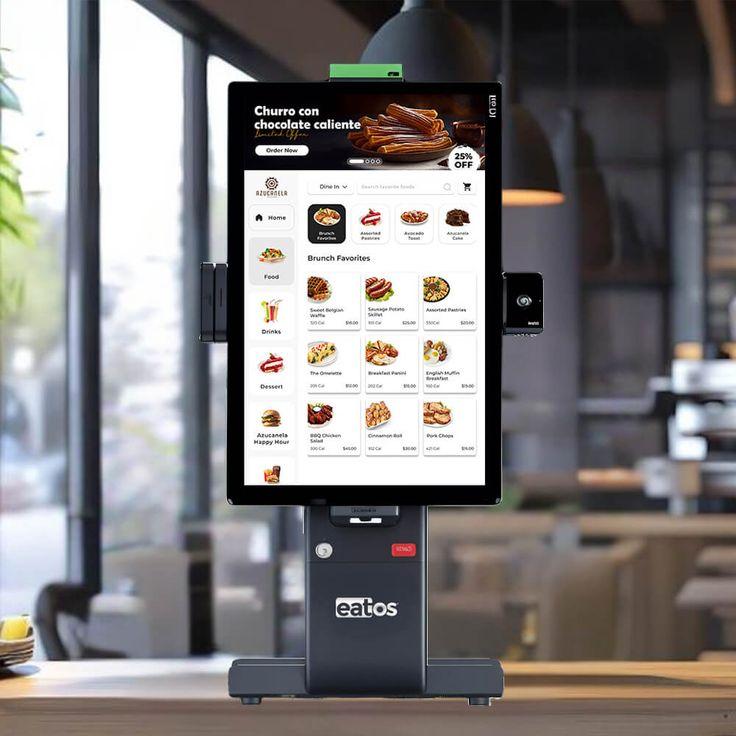
POS stands for point of sale, the moment a customer pays for a product or service. POS software is the application that manages that moment and everything connected to it. It records each transaction, calculates taxes and discounts, accepts payments, prints or emails receipts, and updates stock counts instantly. It runs on tablets, desktops, or dedicated touchscreen terminals, and usually connects to hardware such as barcode scanners, card readers, receipt printers, and cash drawers.
How POS Software Benefits a Business
Fewer Errors at the Counter
Automated pricing, tax calculation, and discount rules remove the mistakes that creep in with manual billing. Staff spend less time working things out and more time serving customers.
Accurate, Real-Time Inventory
Each sale reduces stock automatically, so counts stay current without constant manual checks. Low-stock alerts help you reorder before shelves run empty.
Clear Sales Insight
Reports reveal top-selling products, slow movers, busy hours, and profit margins. This information supports better purchasing, pricing, and staffing decisions.
Faster Checkout and Happier Customers
Quick scanning, flexible payment options, and instant receipts shorten queues and improve the overall shopping experience.
Stronger Control Over Staff Activity
Individual logins and permission levels create accountability. Owners can restrict refunds, price changes, and report access to trusted users.
Essential Features to Look For
Billing and Payments
-
Barcode and manual item entry
-
Multiple payment methods, including cash, cards, and mobile wallets
-
Split bills and partial payments
-
Returns, exchanges, and refunds
-
Discounts and promotional pricing
Inventory Management
-
Real-time stock tracking across locations
-
Supplier and purchase order management
-
Batch, serial number, and expiry tracking where relevant
-
Stock transfer between branches
Reporting and Analytics
Look for daily sales summaries, profit and loss views, category performance, and employee reports that can be filtered by date, location, or product.
Customer Management
Customer profiles, purchase history, and loyalty programmes encourage repeat visits and give you a clearer picture of who buys what.
Integrations
Connections to accounting software, e-commerce stores, and payment providers prevent duplicate data entry and keep records consistent across channels.
POS software Pakistan helps businesses manage billing, inventory, sales, payments, and daily operations more efficiently from one reliable platform.
Types of POS Software
Cloud-Based POS
Data lives on secure remote servers and can be reached from any internet-connected device. Updates are automatic, and multi-location oversight is simple. Reliable connectivity is the main consideration.
On-Premise POS
Software and data are stored on local machines. This offers direct control and works without internet, but requires manual updates, backups, and more hands-on maintenance.
Mobile POS
Running on smartphones or tablets, mobile POS suits market stalls, pop-up shops, delivery services, and restaurants taking orders at the table.
Industry-Specific POS
-
Retail POS focuses on barcodes, variants, and stock control
-
Restaurant POS adds table layouts, kitchen tickets, and menu modifiers
-
Salon and service POS includes appointment booking and staff commissions
Hardware That Works With POS Software
Software is only half the setup. Common hardware includes:
-
Receipt printers, usually thermal for speed and low maintenance
-
Barcode scanners for fast, accurate item entry
-
Card terminals for contactless and chip payments
-
Cash drawers that open automatically after a cash sale
-
Customer-facing displays showing prices and totals
Always confirm hardware compatibility before purchase, and keep spare consumables such as receipt paper on hand to avoid interruptions during busy periods.
How to Choose the Right POS Software
-
List your requirements based on your industry, size, and daily workflow
-
Set a realistic budget covering software, hardware, setup, and training
-
Request a demo or free trial and test it with real products and staff
-
Check scalability so you can add users, devices, or locations later
-
Review security measures, including encryption, backups, and user permissions
-
Assess support quality, including availability, response time, and training resources
-
Read independent reviews from businesses similar to yours
Understanding the Cost
Pricing models vary. Some vendors charge a monthly subscription per terminal or location, while others sell a one-time licence with optional support fees. Additional costs may include hardware, payment processing fees, integrations, and premium support. Compare the total cost over two or three years rather than focusing only on the initial price.
Common Mistakes to Avoid
-
Picking the cheapest option without checking whether it meets your needs
-
Skipping staff training, which leads to errors and frustration
-
Neglecting data backups, risking lost records if something fails
-
Overlooking integrations with existing accounting or online sales tools
-
Ignoring future growth, then facing a costly migration later
Tips for a Smooth Implementation
Start by cleaning your product list so names, prices, and stock levels are accurate before import. Train staff on core tasks first, such as billing and refunds, then introduce reporting and inventory features. Run the new system alongside your old process briefly to catch issues early, and review reports regularly so the data actually informs decisions.
Conclusion
POS software has grown well beyond a digital cash register. Used well, it speeds up service, tightens inventory control, and gives owners the insight needed to grow with confidence. The best system is the one that matches your industry, fits your budget, and comes with reliable support. Define your needs, test before committing, and invest in proper training. Do that, and your POS software will become one of the most valuable tools in your business.
Explore trusted business resources to learn how modern digital tools can improve efficiency, reporting, inventory control, and everyday operations.
 Swedish
 Turkish
 English
 Arabic
 French
 Spanish
 Portuguese
 Deutsch
 Dutch
Dutch
 Italiano
 Russian
 Kurdish
 Romaian
 Portuguese (Brazil)
 Greek
Greek
 Bulgarian
 Ukrainian
 Czechoslovakia
 Hindi
Hindi
 Chinese
 Japanese
 Indonesian
 Korean
 Hungarian
 Malay
Malay
 Lithuanian
 Norwegian
 Danish
 Bengali
 South America